About the template
The template handles Seznam SEM measurements.
Seznam SEM is not compatible with Sklik measurements prior to 2026. To use SEM, you must first migrate your Sklik account to SEM. Only then can you generate an SEM ID in the administration.
Settings
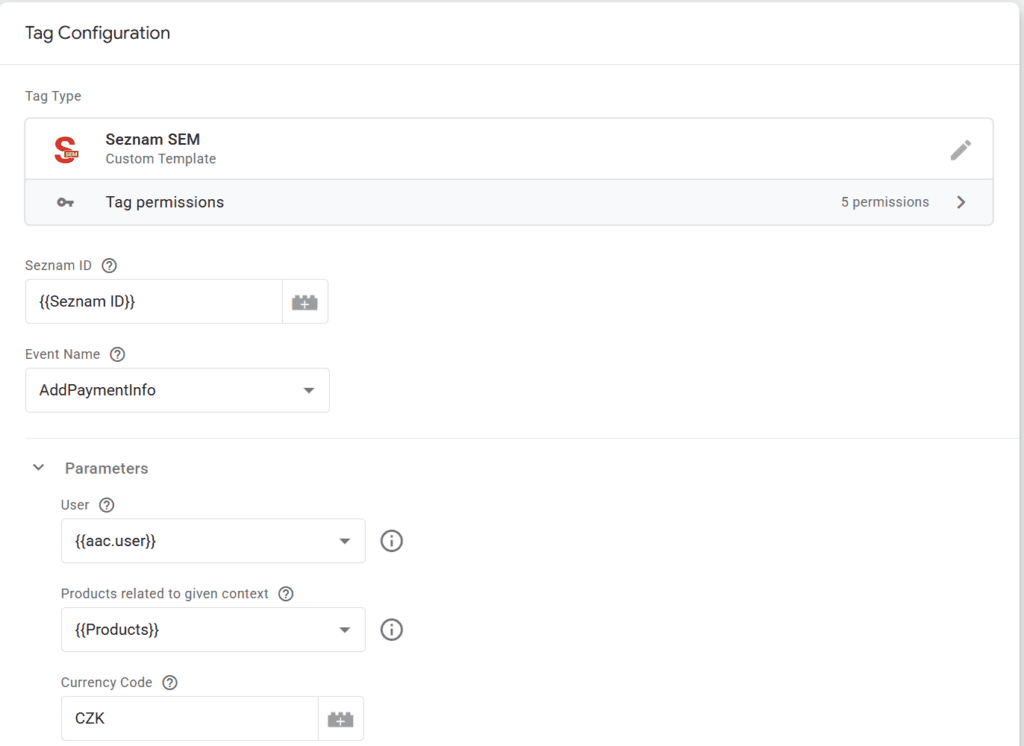
Mandatory data
- Seznam ID – measurement ID that you can generate in the Sklik administration.
If you do not have a Sklik account migrated to SEM, you cannot generate this value. - Event Name – event type, e.g., PageView, etc.
Depending on the event type, different data may be required.
SEM does not currently allow you to send your own events, but this will likely be possible in 2027.
Where to get a Seznam ID
In the Sklik administration, go to settings.
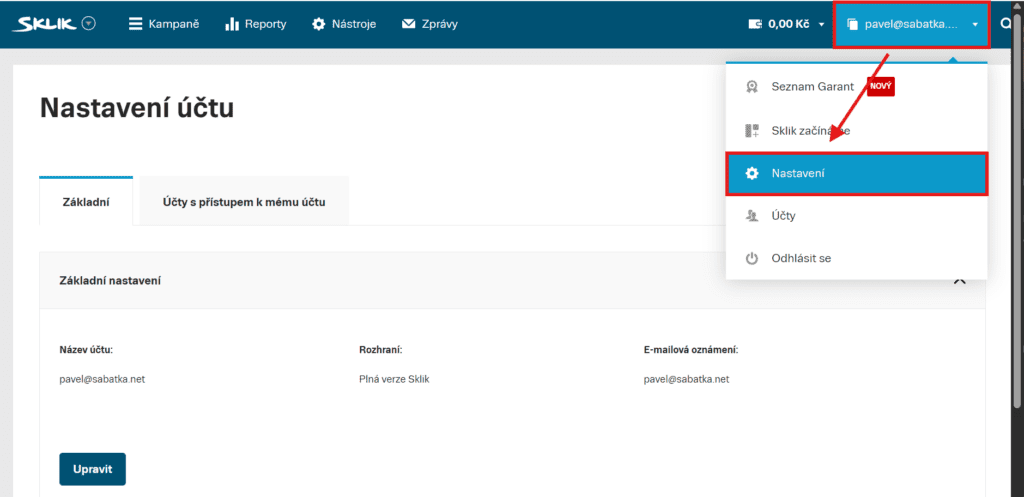
In the “Measurement Management” section, you will find the SEM ID, which you can copy to the clipboard and use.
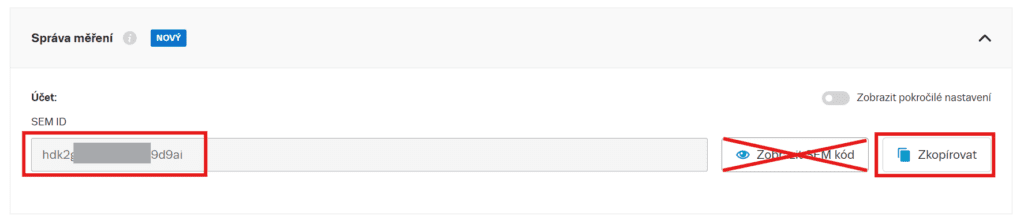
Please note: next to the “Copy” button, there is a “Show SEM code” button. Do not use this!
The code in “Show SEM code” contains the ID for a different library and cannot be uset as SEM ID!
Mandatory data for specific events
The fields for entering values will appear when you select the Event Name for which they are relevant.
- User – a user object that has attributes such as email, phone, etc. See below for exact specifications.
Relevant forPageViewandUserDataUpdateevents. - Products – a field of products related to the event. For example, for Purchase, these are purchased products, for Search, these are products found in a search, for AddToCart, these are products added to the cart, and for ViewContent, this is a field of displayed products.
Each product can have an ID, name, category, price, and quantity in some- Google Ecommerce
- Shoptet
- Order – order object, in Google Ecommerce or Shoptet format.
- Currency Code – three-digit currency code, e.g. CZK or EUR
- Content Type – only for events of the “ViewContent” type. Values can be
- product – for displaying product details
- product_group – used on category pages or product lists
- page – for measuring content pages, e.g., blog articles
- Order – objekt objednávky, a to ve formátu Google Ecommerce nebo Shoptet.
- Currency Code – třímístný kód měny, např. CZK nebo EUR
Optional parameters
- Page URL – if you need to send a “virtual page URL”
- Event ID – you must send this if you are using browser and server-to-server measurement.
Events are deduplicated based on the Event ID – the first event received is always counted.
Note: The template automatically generates an ID for the Purchase event (unless you enter your own). This allows transactions to be deduplicated. - Content Name – the name of the content. This makes sense, for example, for ViewContent on a blog article.
- Page Category – page category.
- Value – event value.
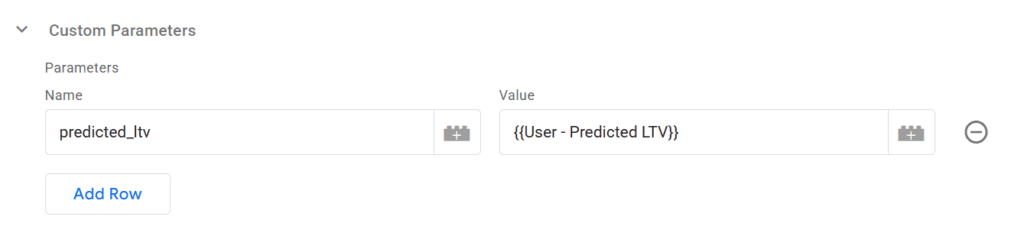
Custom parameters
If you need to enter your own values, you can enter them in key-value format according to the SEM documentation.
Transmitted data
User
It is passed with the PageView event. If the user’s status changes while the page is loading, call the “User Data Update” event after the change.
Assumes an object in the shape of
{
  email: '[email protected]',
  phone: '+420777111222',
  first_name: 'Harry',
  last_name: 'Potter',
  gender: 'male',
  city: 'Bristol',
  street: 'Prived drive 4',
  postal_code: 'BS13 9RN',
  country: 'Great Britain',
  registered: true,
  predicted_ltv: 9.75
}
Products
It always assumes a field of objects in the shape of Google Ecommerce or the shape used by Shoptet.
[
  {
    item_id: "SKU_12345",
    item_name: "Stan and Friends Tee",
    discount: 2.22,
    item_category: "Apparel",
    item_category2: "Adult",
    item_category3: "Shirts",
    item_category4: "Crew",
    item_category5: "Short sleeve",
    price: 10.01,
    quantity: 3
  }
]
Order
An order in the Google Ecommerce format or the format used by Shoptet is always assumed.
{
  transaction_id: "T_12345_1",
  value: 30.03,
  tax: 4.90,
  shipping: 5.99,
  currency: "USD",
  coupon: "SUMMER_SALE",
}
Consent mode
If you are using consent mode v2, the template will read the consent status itself.
If you are not using consent mode v2, you need to uncheck the “Using Consent Mode v2” box and pass the consent status manually.

For the Consent Statuses object, enter an object in the form
{
  ad_storage: 'granted',
  ad_personalization: 'granted',
  ad_user_data: 'granted',
  analytics_storage: 'granted',
  functionality_storage: 'granted'
}
Possible consent statuses are granted, 1, true (allowed) or denied, 0, false (denied).
Recommended settings for specific pages
Depending on the type of website, we recommend the following settings:
- Product categories
Send PageView and ViewContent events.
In the ViewContent event, select- Content Type = product_group
- Products – products displayed on the page (you send them to GA4 as impressions)
- Product details
Send PageView and ViewContent events.
In the ViewContent event, select- Content Type = product
- Products – field with one element (displayed product)
- Search
Send PageView and Search events.
In the Search event, configure- Products – products displayed on the page (you send them to GA4 as impressions)
- First step of checkout
Send PageView and InitiateCheckout events.
In the InitiateCheckout event, set- Products – field with products in the cart
- Completing the order
Send PageView and Purchase events.
In the Purchase event, select- Order – order data
- Products – field with products in the cart
- Blog article or content page
Send PageView and ViewContent events.
In the ViewContent event, set- Content Type = page
- Enter Content Name
CSP
If your website uses CSP (consent security policy) headers, you must enable:
script-src l.seznam.cz
Note: This directive can be omitted if you are usingnoncefor GTM verification.connect-src https://*.seznam.cz
Note: The script connects to the domainshttps://l.seznam.czandhttps://sem.seznam.cz
Note: If you have no idea what CSPs are, try setting up the measurement and see if it works or not. If it does, you don’t need to worry about this 😀
If the measurement is not working, check whether there is an error in the browser console saying “Refused because Consent Security Policy.” If there is, this needs to be resolved.

Other
Disclaimers
I develop the template in my spare time to save you time and work. I am not responsible for its use or any damage caused by its use. The template downloads scripts from a third party (Heureka.cz), according to the documentation published by Heureka.cz. I am not responsible for any shortcomings in terms of GDPR.
Consultation
If you have problems with deploying the template, you can contact me for a paid consultation.