
If you’ve opened the acquisition reports in Google Analytics 4 (GA4), you’ve likely encountered a terminological “stew.” While the old Universal Analytics sufficed with a simple “Source/Medium,” GA4 serves up several variations of (almost) the same thing. For the source/medium dimension, we now have:
- First user source / medium
- Session source / medium
- Source / medium (no prefix)
- First user manual source / medium
- Session manual source / medium
- Manual source / medium
- SA360 source / medium + other combinations
- CM360 source / medium + other combinations
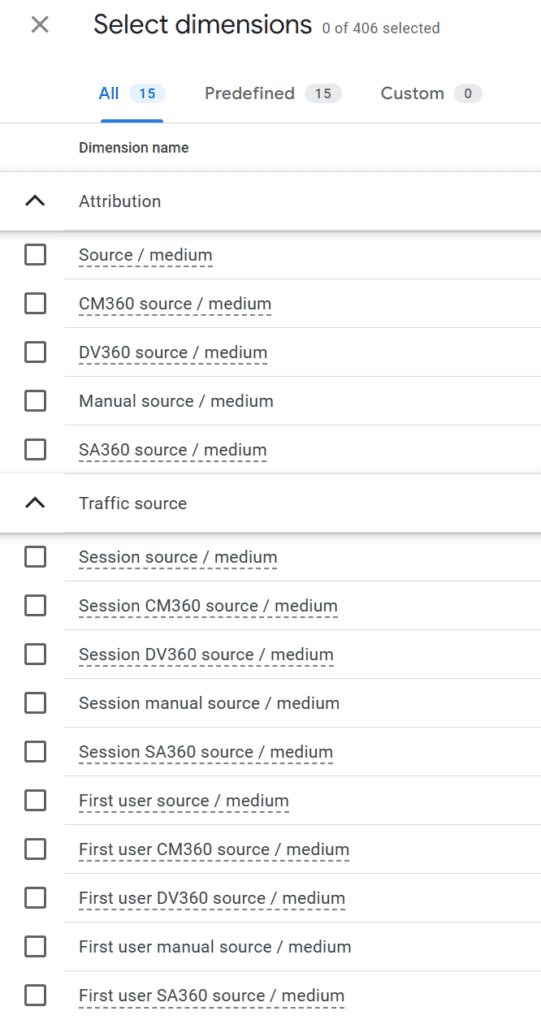
In total, there are 15 different versions. Total chaos.
Let’s clear things up.
1) First User Dimensions (First Interaction)
This dimension answers the question: “How did this person find us for the very first time?” If a user arrived via organic search in January, GA4 marks them (using cookies) as “Organic.” Even if they return via a paid ad in February, they will forever be recorded as “Organic” in the First user source dimension.
When to use: For analyzing Long-Term Value (LTV) and brand strategy.
Behavior: These dimensions effectively act as First-click attribution.
2) Session Dimensions (Visit Source)
Here, we are talking about current performance. This dimension answers: “What started this specific visit?” If the same user clicks on your newsletter, the Session source will be “email.” This is the most used metric for evaluating monthly campaigns.
- Behavior: These dimensions correspond to Last-click attribution.
- What to watch out for:
- Session Timeout: GA4 ends a session only after 30 minutes of inactivity. Unlike Universal Analytics, a session in GA4 is not restarted by a change in traffic source.
- User_ID Magic: Be careful when using the user_id feature—especially for e-commerce sites with online payment gateways. It can lead to the “forgetting” of the original session source. I recommend geeks study up on “session magic.”
3) Dimensions Without a Prefix (Event Level)
When you see just “Source” or “Medium” without a prefix, we are talking about Attribution. This dimension doesn’t focus on visits, but on specific events (e.g., a purchase). it assigns credit to the source based on the attribution model set in your administration (Default: Data-driven).
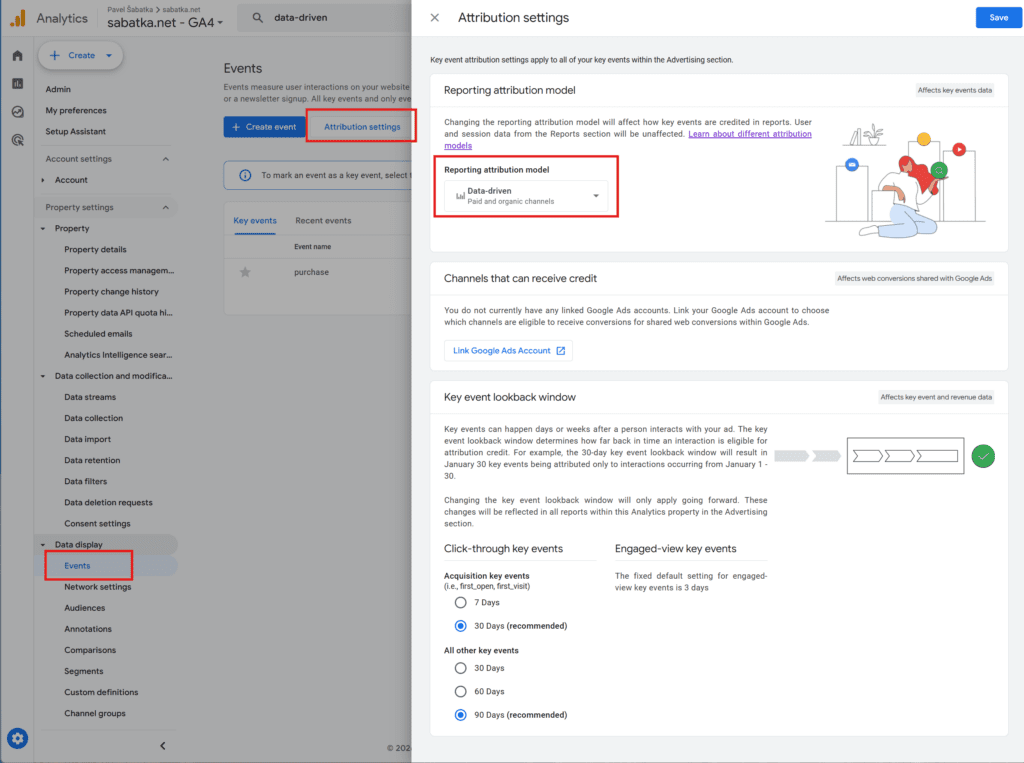
Imagine a single order worth $1,000. If you have Data-driven attribution enabled, the algorithm splits that $1,000 among all channels that ever brought the person to the site before the conversion, based on the weight it assigns to them. In your report, you might see:
- Facebook: 0.2 conversions ($200)
- Google Ads: 0.3 conversions ($300)
- Newsletter: 0.5 conversions ($500)
These numbers are dynamic. Note that the model works with decimal values (e.g., 0.2 of an order). This doesn’t happen with other models.
Warning: These dimensions are only calculated for Key Events. If you combine the “Source / Medium” dimension with the “Sessions” metric, you will only see sessions that included key events—it might actually look like your data has disappeared from GA4.
When to use: Use in the “Advertising” section reports to understand the path to conversion. Combine with metrics like “Key events” or “Purchase revenue.”
4) Manual Dimensions (UTM Data)
These dimensions were added to GA4 in February 2024. They differ from the others in two ways:
- If there is at least one UTM parameter in the URL, data for all dimensions is taken strictly from the UTMs.
- If GA4 cannot recognize the source of the visit, the Manual source is always (not set). In other dimensions (like Session source/medium), the same visit might appear as (direct) / (none).
Pokud nejde GA4 nerozpoznají zdroj návštěvy, pak je manual source vždy (not set). V ostatních dimenzích (např. Session source / medium) se může stejná návštěva projevovat více různými způsoby, např. (direct) / (none) nebo (not set).
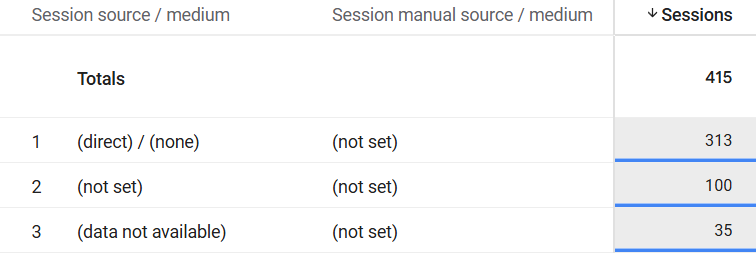
In GA4, “manual” dimensions are available for all scopes, meaning you can have:
- First user manual source / medium
- Session manual source / medium
- Manual source / medium
When to use: For tagging audits. If you see (not set) here, it means the visit had no UTMs and no traceable origin. While a regular report might “mask” this as Direct, the Manual report admits the source is unknown.
5) Dimensions for the “Big Players” (SA360 and CM360)
These are for the Enterprise level. They allow you to see the performance of campaigns from search engines (Search Ads 360) or ad servers (Campaign Manager 360) in much greater detail than the standard interface. In practice, you see these dimensions in Explorations, but they will likely be empty unless your GA4 is linked to professional Google Marketing Platform tools.
Practical Example: Three Purchases by One Customer
Imagine the journey of a loyal customer:
- January: Arrives via Google Ads and makes the 1st purchase.
- February: Arrives via Newsletter and makes the 2nd purchase.
- March: Arrives via Organic Search and makes the 3rd purchase.
How will this look in reports for all three transactions?
- User Acquisition Report (First User): You will see all 3 conversions attributed to Google Ads. To this report, it’s still the same person you “caught” back in January.
- Traffic Acquisition Report (Session): You will see 1 conversion for Google Ads, 1 for Email, and 1 for Organic. This report fairly distributes credit based on what immediately preceded the purchase.
- Conversions Report (Event-level): Here you will see data influenced by the Attribution Model. You might see decimal numbers (e.g., 0.7 conversions) because the system split the credit among multiple channels on the path.
Reality Check: The Fragile Kingdom of Cookies
The theory sounds great, but there’s a catch: Cookies. The entire “First User” logic relies on the browser remembering the ID that GA4 assigned during the first visit. In today’s “privacy-first” world, these dimensions aren’t 100% reliable:
- Cookie Deletion: If a user clears their history, they become a “First User” again.
- Apple ITP: Safari aggressively shortens cookie lifespan. A “First visit” can essentially restart every week.
- Consent Mode: If a user rejects cookies, GA4 models the data, but identifying a “returning” user becomes much harder.
The result? Your New User reports will likely always be higher than reality because one person “breaks apart” into multiple new users over time.
Which Dimension Should You Choose?
For reporting to your boss/client: Stick to Session source/medium. It’s a conservative and generally fair view of what you spent your budget on and what brought people to the site in that period.
For deep-dive campaign analysis: Go to the Advertising section and use dimensions without a prefix. There, you’ll see who is “passing the ball” for those goals.
Do you need to be sure your GA4 is measuring business reality, or are you struggling with Looker Studio settings? I’d be happy to look at your measurement as part of an audit. Get in touch, and let’s connect your data with your business reality.