
Imagine the following situation. A visitor comes to your website, fills out an order form—name, email, phone number—and submits it. The data goes to your CRM or database.
But it’s quite possible that the same data — hashed, but still identifiable — is also being sent to the servers of Google, Meta, TikTok, Pinterest, and other platforms at that very moment. Automatically. Without a single line of code from you.
It is called automatic advanced matching (Meta), user-provided data capabilities (Google), automatic advanced matching (TikTok, Pinterest), and other names on other platforms. The principle is the same everywhere: an advertising pixel on the page automatically searches form fields, hashes the personal data found using the SHA-256 algorithm, and sends it to the platform. The platform then matches it with its user database.
How it works technically
The advertising pixel script scans HTML pages and searches for form fields that look like email, phone, name, address, or zip code. It detects this based on attributes such as type="email", type="tel", or field names and placeholders (e.g., name="phone", placeholder="Your email").
Once the user submits the form (or in some cases just leaves the page), the pixel hashes the values from these fields using SHA-256 and sends them to the platform’s server. The platform then compares the hash with its database — if it finds a match, it knows that user X filled out the form on your website.
TikTok goes even further — its Automatic Advanced Matching not only scans form fields, but also static text on the page (such as the logged-in user’s displayed email) and selected JavaScript variables such as window.dataLayer.
Which platforms are affected?
This is not a marginal issue. In some form, it is a standard feature of all major advertising platforms. For each one, I list what the feature is called, what it collects, and—most importantly—whether it scans forms automatically and whether it is enabled or disabled after creating an account.
Meta (Facebook/Instagram)
“Automatic Advanced Matching” feature
Pixel searches forms and collects email, phone number, first and last name, city, state, postal code, country, date of birth, gender, and external ID. By default, this feature is disabled—you must actively enable it in Events Manager (Data Sources → Pixel → Settings). Companies in “restricted industries” (banking, insurance, pharmaceuticals, healthcare) cannot use automatic pairing at all and must resort to the manual option.

„User-Provided Data” function (in GA4) / „Enhanced Conversions” (in Google Ads)
In GA4, this feature is called “User-provided data collection,” and in Google Ads, it is called “Enhanced Conversions.” The Google tag can automatically detect data that looks like an email address, phone number, or name and address. By default (after creating an account), it does not send data, even though it may appear to do so.
To turn it on, you need to:
- Admin > Property > Data Collection and modification > Data streams > Configure tag settings > Allow user-provided data capabilities
This setting is enabled by default.
- Admin > Property > Data Collection and modification > Data collection
Here, you need to enable User-provided data collection.
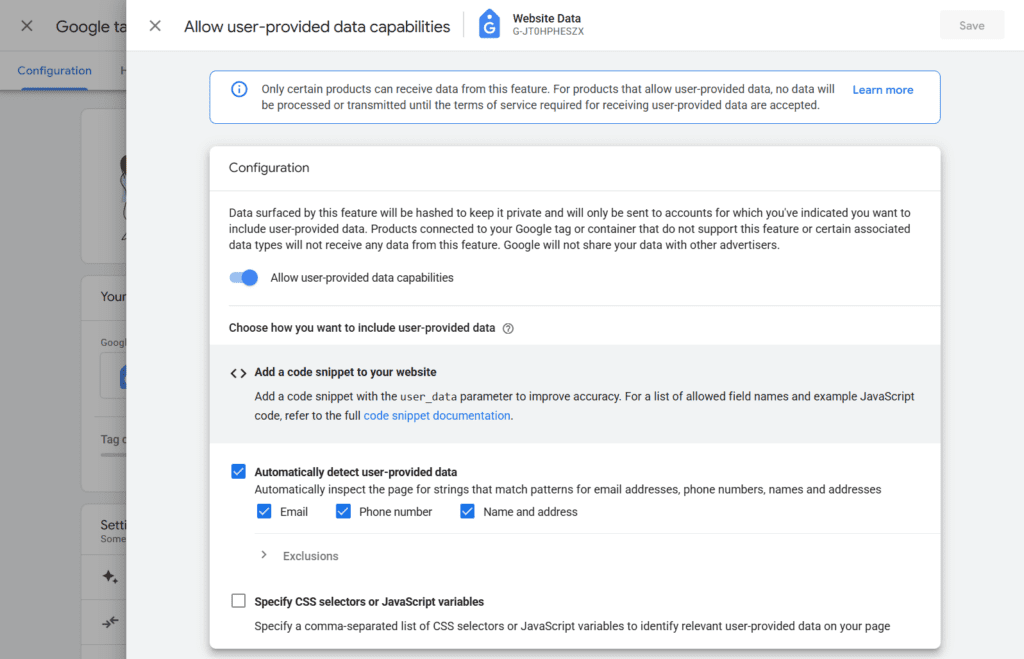
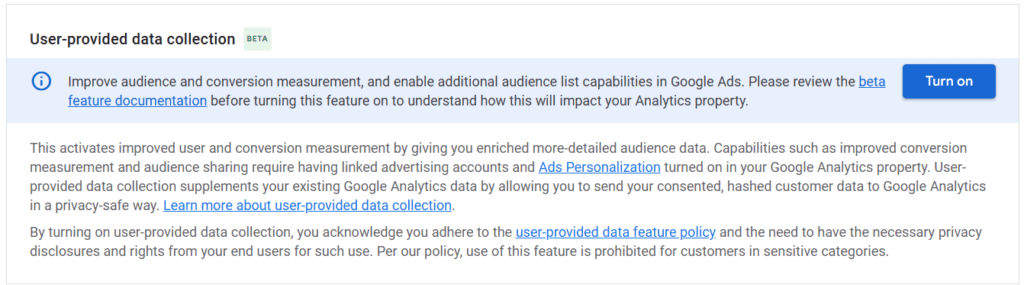
If both conditions are met, the parameters em (with email hash), ecid (matching identifier), and ec_mode=a (detection mode, where a means automatic detection) will be added to requests to GA4.
TikTok
Funkce „Automatic Advanced Matching”
Pixel automatically identifies form fields, hashes and collects emails, phone numbers, names, addresses, and other identifiers. TikTok goes the furthest of all — it scans not only forms, but also static text on the page (e.g., the displayed email of a logged-in user) and JavaScript variables such as window.dataLayer.
By default, the feature is disabled — it can be enabled in the pixel settings in Events Manager. And, unsurprisingly, TikTok marks the feature as recommended.

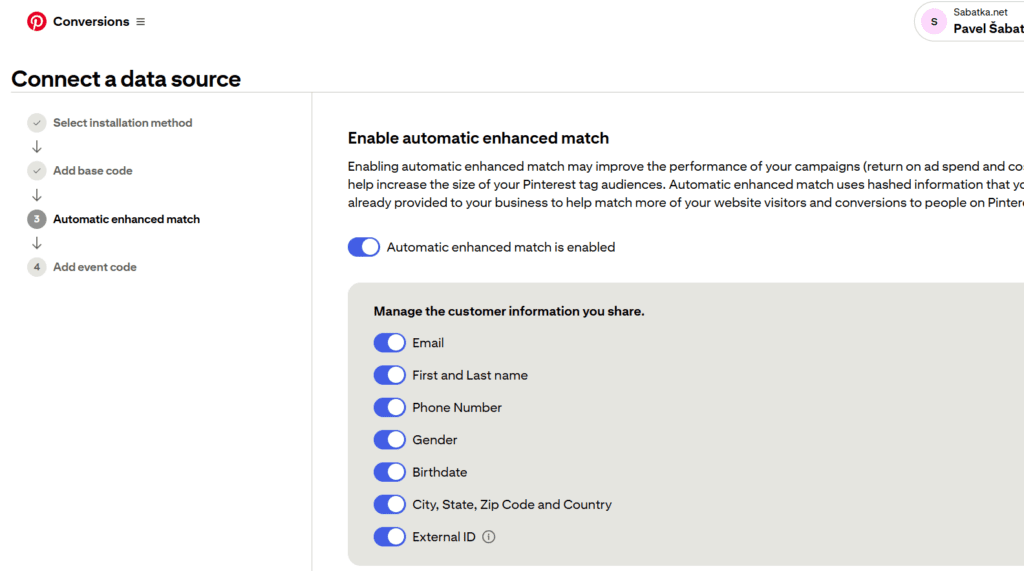
„Automatic Enhanced Match” function
Pinterest tag collects emails, names, phone numbers, gender, birth dates, external IDs, cities, states, zip codes, and countries.
When you create a new tracking tag, “Enable automatic enhanced match” is enabled by default. Unless someone checks this, form scanning runs from day one.
I consider this to be the biggest dark pattern of all the platforms mentioned. A platform full of fashion and cakes, yet with a data appetite like Meta after three days of fasting.
Manual user matching
Not all platforms scan forms automatically. Some only allow manual user linking—you have to submit personal data to the platform in the source code. In my opinion, this is a better option—you have control over what you send and can monitor all the necessary data.
- Microsoft Ads – Enhanced Conversions function
- LinkedIN – Enhanced Matching function
- X (Twitter) – User Parameters
Cookie bars and consent settings
Google Tag Manager works with several levels of consent — ad_storage, analytics_storage, ad_user_data, and ad_personalization. Advertising pixels are typically triggered based on ad_storage (sometimes in combination with ad_personalization). However, the transfer of personal data falls under ad_user_data.
This can lead to a situation where the platform “takes” personal data without consent after the pixel is triggered.
What do the platforms recommend?
Unsurprisingly: turn everything on. Every platform emphasizes in its documentation that the more data you send, the better the matching, attribution, and campaign performance will be. Meta recommends “enabling all parameters.” TikTok says “use manual and automatic matching at the same time.” Google offers “automatic detection” as the easiest way.
From the platform’s perspective, this makes sense — more data = better machine learning = better ad results. From the perspective of the website operator and GDPR compliance, it’s more complicated.
Why you should care
The issue here is not whether these technologies are “bad.” The issue is that they run automatically, and many website operators are unaware that personal data is being collected from forms on their sites and sent to third parties.
Consider a few things:
Awareness. Do you know which pixels on your website scan forms? Do you have an overview of what data they send? If you use Google Tag Manager and have pixels from five platforms, it is quite possible that each of them collects data in its own way.
Control. Automatic scanning is convenient, but it takes away your control. Pixel decides for itself what looks like an email or phone number. It can even collect data that you didn’t want to share — such as a customer support email address displayed on a page, as one implementation expert points out.
Legal responsibility. Under GDPR, you are responsible for the processing of personal data on your website. “We didn’t know, the pixel did it itself” is not a defensible position. The Austrian Data Protection Authority has already ruled that the use of Meta Pixel without prior consent violates GDPR.
Visitor trust. Your customers fill out a form expecting that your company will receive their data. Not Google, Meta, TikTok, and Pinterest all at once.
What to do
I’m not saying you should turn everything off. I’m saying: make a conscious decision.
Do a pixel audit on your website. Go through the settings of each platform and check if you have automatic form scanning enabled that you might not even know about. For Google Tag, check the “Allow user-provided data capabilities” setting. For Meta, look at Automatic Advanced Matching in Events Manager. For Pinterest, verify—especially if you’re a new advertiser—that the default settings align with your intentions.
Make sure your consent management actually controls pixel loading. Having a cookie banner isn’t enough—it must really block scripts until consent is given.
And most importantly: consciously decide who you want to send what data to and how. Instead of automatic scanning where you have no control over what the pixel collects, consider manual implementation (manual advanced matching), where you explicitly define what data is sent and on what action. Or use Conversion API / server-side solutions, where you have full control over what leaves your server.
There’s a difference between “we send the hashed email of a customer who completed an order and agreed to the terms” and “the pixel automatically scans all forms on the site and sends whatever it finds.”