
Between May 20 and June 29, 2026, Google rolled out a new interface, and for containers with a single active workspace, it simply hid the switcher.
GTM Workspace Switcher Missing? Here’s Why
Google announced the new interface on May 20, 2026, and the full rollout wrapped up by the end of June. It targets users with a single workspace — typically someone who opens GTM once a month, for whom a switcher they never touch just eats up menu space. For anyone working in GTM daily or as part of a team, though, it’s a feature you want in plain sight, not tucked away.
How to Restore Workspace Switcher in Google Tag Manager
There are two ways to restore the workspace switcher in Google Tag Manager. One is permanent, the other’s a quick workaround for right now.
Permanently, via settings:
- In the top right, click the three dots next to your account.

- Open User Settings → Application Preferences.
- Check the Always show Current Workspace option and save.
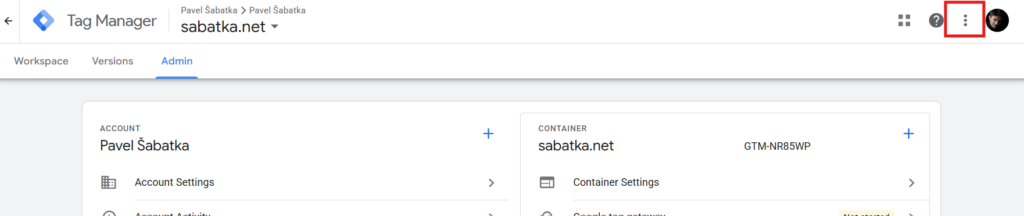
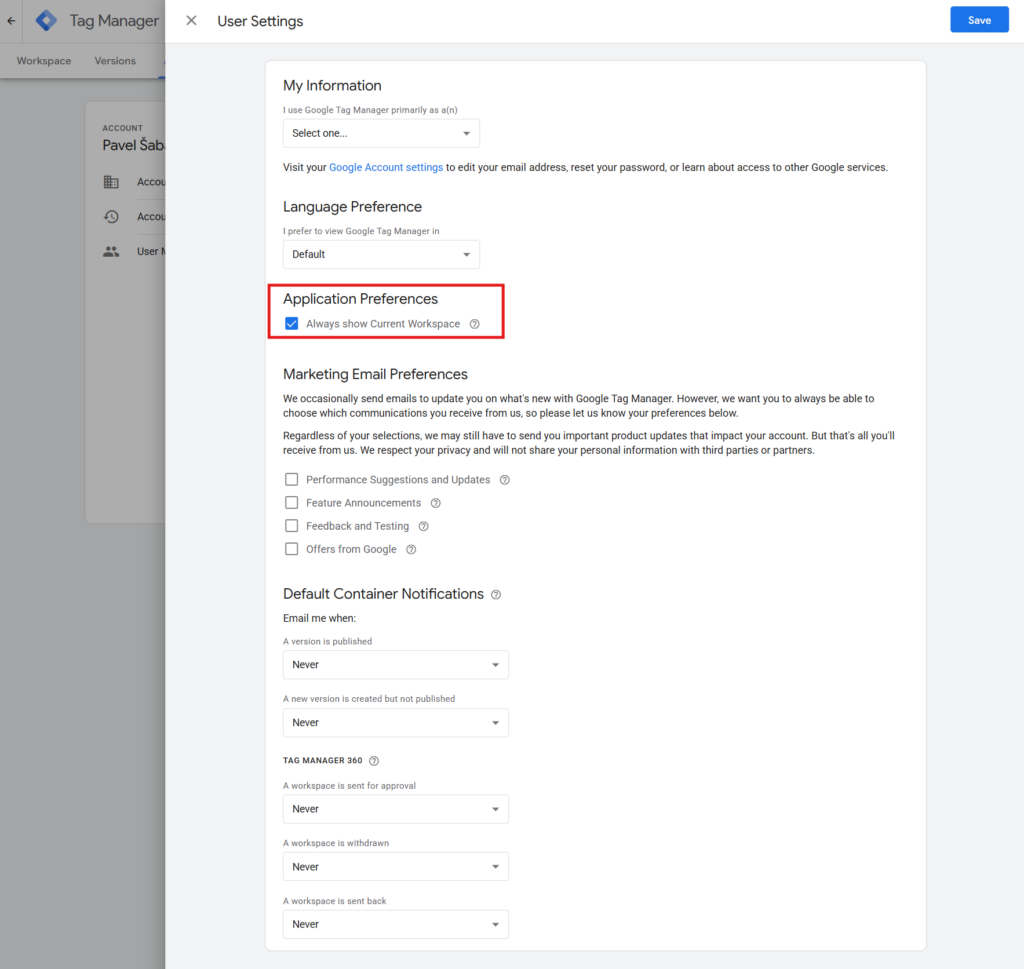
From that point on, the switcher shows up for every container — even the ones with a single workspace.
Quickly, by creating a second workspace:
Go to Overview → Pending Changes, click the three dots, and choose Manage Workspaces. Once a container has a second workspace, the switcher appears on its own — because now there’s actually something to switch between. If you’re on free GTM and you’ve already used up your limit of three workspaces, this route won’t work for you — use the permanent option above instead.
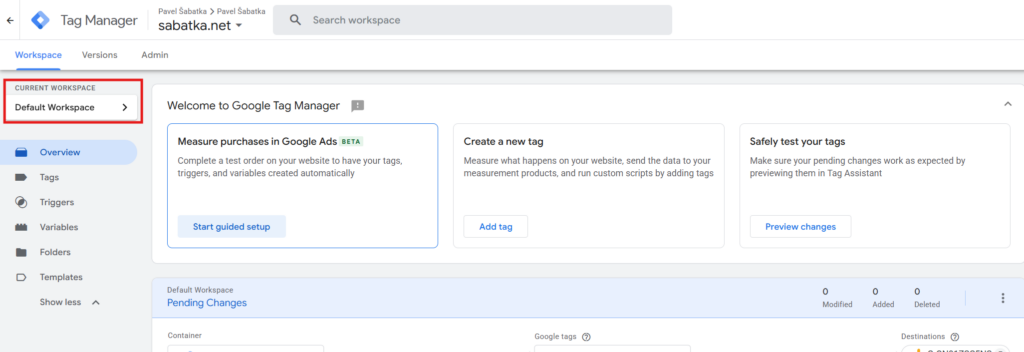
More on why I’d recommend keeping a second workspace around anyway, regardless of this interface change, in a moment.
What Workspaces Are, and Why I Don’t Want to Lose Sight of Them
A workspace is a separate working version of a container in GTM. You can edit tags, triggers, and variables in it without pushing anything to production. On projects where several people work on the same container at once, workspaces keep unfinished work separate from what’s live — and let you publish only what’s actually been tested.
Free GTM handles three concurrent workspaces (one default plus two of your own); Tag Manager 360 has no limit.
This isn’t an advanced-user detail. It’s protection against someone accidentally publishing an unfinished or untested change straight to production — and you scratching your head later about why your report numbers suddenly don’t add up. On projects where I manage GTM for multiple people, controlled publishing is one of the first things I set up.
I find measurement bugs like this at clients on a regular basis, and the earlier workspaces become part of the process, the fewer of them I end up hunting for in the data afterward.

Lab note
It’s like the many-worlds interpretation of quantum mechanics — every workspace is a parallel branch of your container’s reality, running its own experiment. Unlike Everett’s worlds, though, GTM’s branches can be merged back into one.
This Won’t Be the Last Hidden Feature
The new GTM interface hides other advanced features too — triggers, variables, templates, and folders now sit behind a Show more click. The workspace switcher was just the first thing to disappear from the home screen. It won’t be the last.
If you’re running GTM for multiple people or clients and your publishing workflow is more ad hoc than deliberate, this is exactly the kind of thing I set up with clients — workspace strategy, controlled publishing, a QA process. Let’s schedule a consultation, or subscribe to the newsletter so GTM changes like this don’t slip past you next time.