
Embedding a YouTube video on your site? Then you’re dealing with GDPR, whether you’ve thought about it or not. And if you already “solved” this by switching the embed to the youtube-nocookie.com domain, here’s the uncomfortable part: that alone doesn’t get you full youtube-nocookie GDPR compliance. It’s a step in the right direction. It’s not the finish line.
A few months back I wrote about a court in Hannover ruling that Google Tag Manager without consent violates GDPR — simply because GTM itself can load third-party code. A YouTube embed is the same story wearing a different costume: a foreign domain, a foreign script, a foreign server that gets your visitor’s IP address before they click on anything. This article picks up where that one left off — same plot, different lead actor.
A few months back I wrote about a court in Hannover ruling that Google Tag Manager without consent violates GDPR — simply because GTM itself can load third-party code. A YouTube embed is the same story wearing a different costume: a foreign domain, a foreign script, a foreign server that gets your visitor’s IP address before they click on anything. This article picks up where that one left off — same plot, different lead actor.
youtube-nocookie GDPR compliance: what Google promises and what it leaves out
The apparent fix has an official name — Google calls it Privacy Enhanced Mode. It promises exactly two things:
- Watching a video through the nocookie domain won’t feed into personalization of the viewer’s YouTube experience.
- Any ads shown alongside the video won’t be personalized either.
That’s the entire official promise.
Notice what’s missing. Google never says that nothing gets stored about the view. It never says no data is transmitted at all. It promises non-personalization — not anonymity.
Reality sits exactly in between those two claims:
- Simply loading a page with the embed — even on the nocookie domain — sends your visitor’s IP address to Google’s servers. That’s a fact, not an interpretation: it’s a transfer of personal data.
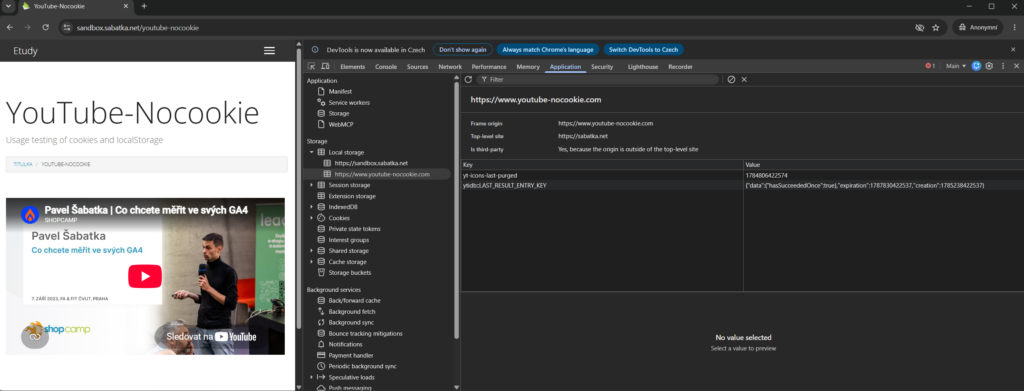
- youtube-nocookie.com writes to the browser the moment the page loads, before anyone clicks anything. I tested this myself: as soon as the embed loaded, two entries appeared in localStorage —
yt-icons-last-purgedandytidb::LAST_RESULT_ENTRY_KEY. The domain says “nocookie,” but you don’t avoid writes to the browser just by not clicking. You can check this yourself: open DevTools, go to Application → Local Storage. - The moment a visitor clicks Play, full YouTube cookies get set. From that point on, the behavior is practically indistinguishable from a standard embed.
One thing I want to knock down preemptively: this isn’t about Google illegally shipping data to the US. Google has been certified under the EU-US Data Privacy Framework since 2023, so that particular boogeyman doesn’t apply here. The real issue sits elsewhere — a YouTube embed isn’t necessary for the site to function, so under the ePrivacy Directive and GDPR it requires active, opt-in consent, EU-wide, not just in Czechia. Czechia, for instance, has required opt-in consent since a 2022 amendment to its telecoms law.
So: youtube-nocookie is a legitimate step. It limits personalization, and unlike a standard embed — which sets YouTube cookies the moment the page loads — it holds off until the visitor clicks Play. On its own, though, it doesn’t solve consent.
The worst option: rewriting the domain with JavaScript after page load
While researching how people handle this in practice, I found guides — including one from an official cookie banner vendor — recommending an elegant-looking trick: let the page render a standard YouTube embed, then use JavaScript after load to rewrite the src attribute from youtube.com to youtube-nocookie.com. It sounds clever. Technically, it doesn’t hold up.
The browser starts fetching the iframe’s content the moment it hits the src attribute in the HTML — which happens before your rewriting script even gets a chance to run. It turns into a race measured in milliseconds: the request to youtube.com can go out before your script manages to fix it. How fast that happens depends on where in the page the script sits, how the page renders, and how much other code runs before it. As a privacy safeguard, this mechanism simply isn’t reliable.
On top of that, your site is still making a request to a third-party domain and handing over data there. This doesn’t solve anything for GDPR — it just fools people who don’t know better.
This is exactly the kind of detail I run into regularly when auditing cookie banners and embedded content — and it’s not just YouTube. It applies to anything your site pulls in from elsewhere, the same way ad pixels automatically read the forms on your website. If you’re not sure what your site is quietly sending out, that’s something an audit can check.

Lab note
Until a visitor clicks the video thumbnail, the page exists in two states at once: “the video is here” and “the video isn’t here.” The click is what decides — a bit like Schrödinger’s cat, except instead of a box you have an iframe, and instead of poison you have consent. Which happens to be exactly the principle behind the fix we’re getting to next.
The real fix: two layers, not one
Building something genuinely clean means doing two things: swap the embed’s domain on the server, and only load the video itself once the visitor actually asks for it. Let’s take them one at a time.
Layer 1 — swap the domain on the server, not in the browser
If you genuinely need the embed to load right away (typically because consent was already given earlier and the video should just play), rewrite the domain wherever the HTML actually gets built — on the server, in a template, or through a content filter in your CMS. On WordPress, that usually means hooking into a filter that modifies content at render time (the_content, for example), or editing the template that generates the embed — not a script running in the browser after the fact. On other systems, look for the equivalent spot: wherever the HTML gets assembled server-side, not wherever the browser just displays it. Do this, and the browser never gets the chance to contact youtube.com at all — the HTML it receives already contains only youtube-nocookie.com from the start. No race against milliseconds, no hoping the script fires in time.
If you’re briefing a developer or an agency, this is the one sentence that matters: the domain gets swapped on the backend when the page is generated — never with JavaScript after it loads.
Layer 2 — load the video only after a click on the thumbnail (the facade pattern)
The facade pattern is a standard recommendation across the EU — the two-click solution has a long tradition, especially in Germany — and the principle is simple: instead of an iframe, the page shows a static thumbnail with a Play button. The real YouTube iframe (on the nocookie domain) only loads once the visitor clicks the thumbnail — exactly the moment from the Schrödinger’s cat analogy where the video decides whether it “is” or “isn’t.”
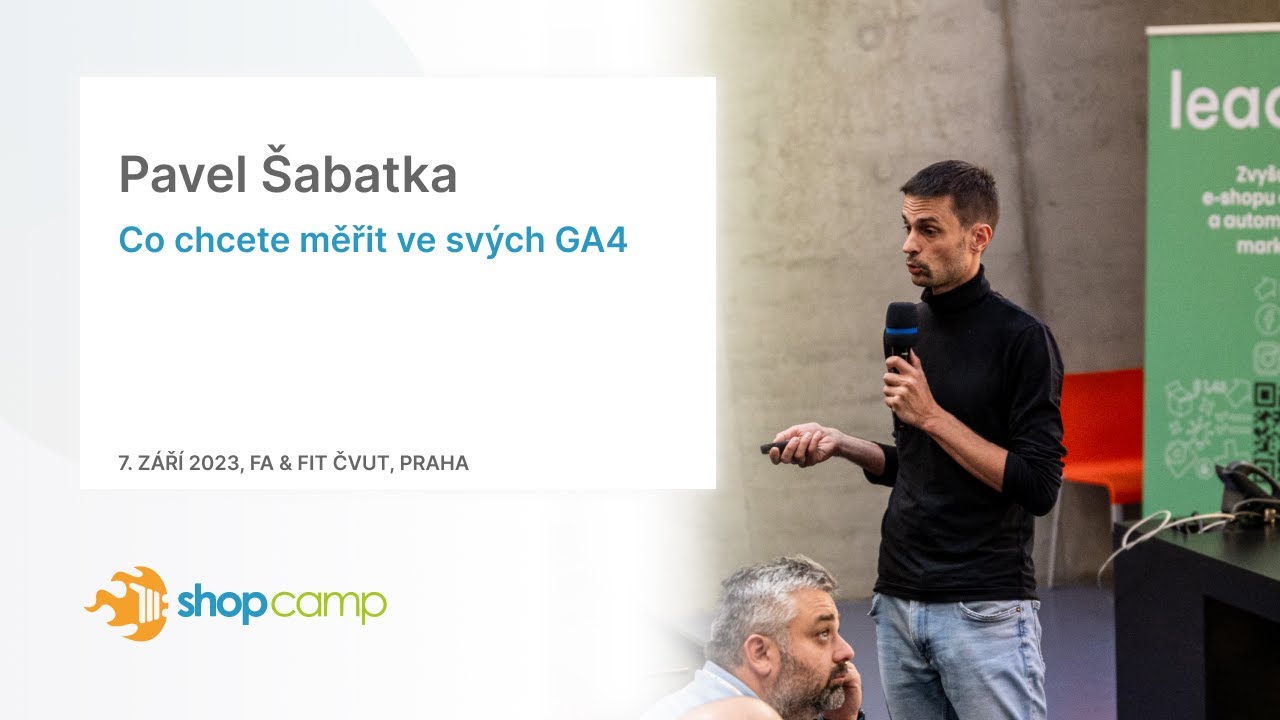
Kliknutím načtete video z YouTube, což může zahrnovat přenos dat společnosti Google. Více informací
One more detail — even the thumbnail image itself, pulled from img.youtube.com, sends the visitor’s IP to Google, since the browser fetches it from Google’s servers. A fully clean setup hosts thumbnails locally instead — download them once when you publish the content and serve them from your own domain. Only a click on Play should trigger anything that talks to Google.
You don’t have to build this from scratch — ready-made implementations of the same principle already exist (the open-source lite-youtube-embed component, for instance, or WordPress plugins that implement the facade pattern). If you want to see the principle in actual code, here’s a minimal, dependency-free example — an HTML thumbnail, CSS for the Play button, and JavaScript that only builds the real iframe after a click:
<div class="yt-facade" data-video-id="KOD_VIDEA" role="button" tabindex="0" aria-label="Přehrát video z YouTube (načte se až po kliknutí)">
  <img src="/MUJ_OBRAZEK.jpg" alt="Náhled YouTube videa" width="720" height="405" loading="lazy">
  <span class="yt-facade__play" aria-hidden="true"></span>
    <p class="yt-facade__note">Kliknutím načtete video z YouTube, což může zahrnovat přenos dat společnosti Google. <a href="/privacy-policy/">Více informací</a></p>
</div>

<style>
.yt-facade { position: relative; display: block; cursor: pointer; width: 100%; max-width: 720px; }
.yt-facade img { display: block; width: 100%; height: auto; }
.yt-facade__play {
  position: absolute; inset: 0; margin: auto; width: 68px; height: 48px;
  background: rgba(0, 0, 0, .75);
  border-radius: 10px;
}
.yt-facade__play::before {
  content: "";
  position: absolute; top: 50%; left: 54%; transform: translate(-50%, -50%);
  border-style: solid; border-width: 12px 0 12px 20px;
  border-color: transparent transparent transparent #fff;
}
.yt-facade__note {
  position: absolute; right: 8px; bottom: 8px; margin: 0;
  max-width: calc(100% - 16px);
  font-size: .75em; line-height: 1.35; text-align: right;
  color: #fff; background: rgba(0, 0, 0, .6);
  padding: .35em .6em; border-radius: 6px;
}
.yt-facade__note a { color: #fff; text-decoration: underline; }
.yt-facade__iframe {
  display: block; width: 100%; max-width: 720px; aspect-ratio: 16 / 9;
border: 0;
}
</style>

<script>
(function () {
document.querySelectorAll('.yt-facade:not([data-bound])').forEach(function
(facade) {
    facade.setAttribute('data-bound', '1');

    var play = functio
      var videoId = facade.dataset.videoId;

      var iframe = doc;
      iframe.className = 'yt-facade__iframe';
      iframe.src = 'https://www.youtube-nocookie.com/embed/' + videoId +
'?autoplay=1';
      iframe.title = 'Přehrávač YouTube videa';
      iframe.allow = 'accelerometer; autoplay; clipboard-write; encrypted-media; gyroscope; picture-in-picture';
      iframe.allowFullscreen = true;

      facade.replaceWith(iframe);
    };

    facade.addEventList) {
      if (event.target.closest('a')) return; // klik na odkaz nespouští video
      play();
    });
    facade.addEventListener('keydown', function (event) {
      if (event.target.closest('a')) return; // Enter na odkazu otevírá odkaz, ne video
      if (event.key === 'Enter' || event.key === ' ') {
        event.preventD
        play();
      }
    });
  });
})();
</script>Three things in this code separate “looks clean” from “is clean”:
- No iframe or loading script ships in the page’s HTML — just a
divwith an image. The browser never touches YouTube’s servers until theplay()function actually runs. The newly created iframe also gets its own CSS class (yt-facade__iframe), so it stays just as responsive as the thumbnail it replaces — not a fixed-size element locked to whatever dimensions the image happened to render at. facade.replaceWith(iframe)only ever runs from a click or a keyboard action —clickandkeydown(Enter or spacebar). Theautoplay=1parameter in the URL then works without issue, because the browser treats it as a response to a user action rather than an automatic autoplay — theiframe.allowattribute withautoplaya few lines up helps with that too.role="button"andtabindex="0"make the thumbnail operable for people navigating by keyboard or screen reader — without them, the facade would just be an unclickable image to them. Thenoscriptfallback covers visitors with JavaScript disabled — they get a direct link to YouTube instead of a dead thumbnail.
And that locally hosted thumbnail mentioned above? Download it once — say, from img.youtube.com/vi/YOUR_VIDEO_ID/maxresdefault.jpg at the moment you publish the content — and store it on your own server or CDN. One catch: maxresdefault.jpg only exists for some videos (typically not for older ones or anything outside a 16:9 ratio), so verify the file actually downloaded before you ship it. Use hqdefault.jpg as a safer default — it’s available for practically every video. No live request to Google when the page loads. The Play button itself isn’t a separate image either — .yt-facade__play is rendered purely in CSS, so you’re not maintaining a second set of assets for hover or focus states, just a color and a shadow.
One more note: videoId goes straight into the iframe’s URL in this code. If it comes from a dedicated CMS field that only editors with permissions can touch, that’s fine as-is. If it could ever come from arbitrary user input, validate the format (11 characters, letters, numbers, hyphen, underscore) before it reaches the address.
If you’d rather not write this by hand, the lite-youtube-embed component mentioned earlier — or the matching WordPress plugin — does exactly this. Same principle, just implemented for you by an existing library.
It’s also worth adding one sentence next to the thumbnail about what happens after the click — something like “Clicking loads a video from YouTube, which may involve transferring data to Google.” That’s not legalese. It’s information for a human.
Lessons from a real implementation
Reality is rarely as clean as this write-up makes it sound. On one client project, we ran into a site where product descriptions — videos included — were pulled in by JavaScript from a third-party service we had no access to integrate with. Rebuilding that entire feed for a fully clean setup with locally hosted thumbnails simply wasn’t realistic. What we could do was switch the domain to nocookie as a pragmatic improvement.
It’s not perfect. But it’s better than nothing, and more importantly, we knew exactly what risk was still left on the table for the client — and wrote that into the site’s terms. The world isn’t black and white. Even a partial fix has value, as long as you know what’s still left to solve after it.
Say it in plain language, not legalese
Whichever combination of the two layers you end up with, it belongs in your cookie banner and privacy policy — in one clear sentence, not a paragraph of legalese. Something like: “Videos from YouTube on this page only load after you consent. Clicking the thumbnail transfers data to Google, including your IP address.”
This part gets skipped a lot, because it’s not a metric anyone watches on a dashboard. I covered the same category of mistake in 5 most common cookie bar configuration bugs — from what I see in audits, roughly a third of companies have their cookie banner set up wrong. An embedded YouTube video is just another spot where the same mistake repeats — nobody notices until someone actually looks closely.
Summary
On its own, youtube-nocookie doesn’t get you GDPR compliance — it limits personalization of playback and ads, but it doesn’t block the IP transfer on page load or the identifiers written to the browser. Real youtube-nocookie GDPR compliance rests on two things: swap the domain on the backend, never with JavaScript after the page loads, and load the video only once someone clicks the thumbnail (the facade pattern).
If you’re not sure your site even gets that first layer right, it’s worth a closer look together — audits usually turn up more than just YouTube. Let’s schedule a consultation.