
Your website has a cookie banner. A visitor clicks “Reject all”, the banner faithfully stores the choice, and you are convinced you’re done. Google Ads still reports missing consent signals.
The banner did nothing wrong. It just never told the tags, the pieces of code on your site that send data to tools like Google Analytics or Google Ads. The banner collects consent, but the tags on the page can’t read it by themselves. Google consent mode v2 is the link between the two: a way for the banner to tell the tags what they are allowed to do. And you can check whether it works in a few minutes, right in your browser.
In this article I explain what consent mode is, why Google wants it, what the difference between Basic and Advanced is (and why “Advanced” does not mean “better”), and how to check the consent state in your browser’s developer tools (DevTools, the F12 key).
Why we need Google consent mode v2: managing consent
The banner is a doorman. Consent mode is the walkie-talkie the doorman uses to tell the rest of the building who he let in. Without the walkie-talkie, the doorman can do his job perfectly and the tags still won’t know a thing.
To be precise: the banner (a CMP, short for consent management platform) collects and stores consent. Consent mode passes it to the tags so they can adjust their behavior. The tags then send data in requests, meaning the messages a browser sends to a server, such as Google’s. Consent mode itself has no banner and does not collect consent.
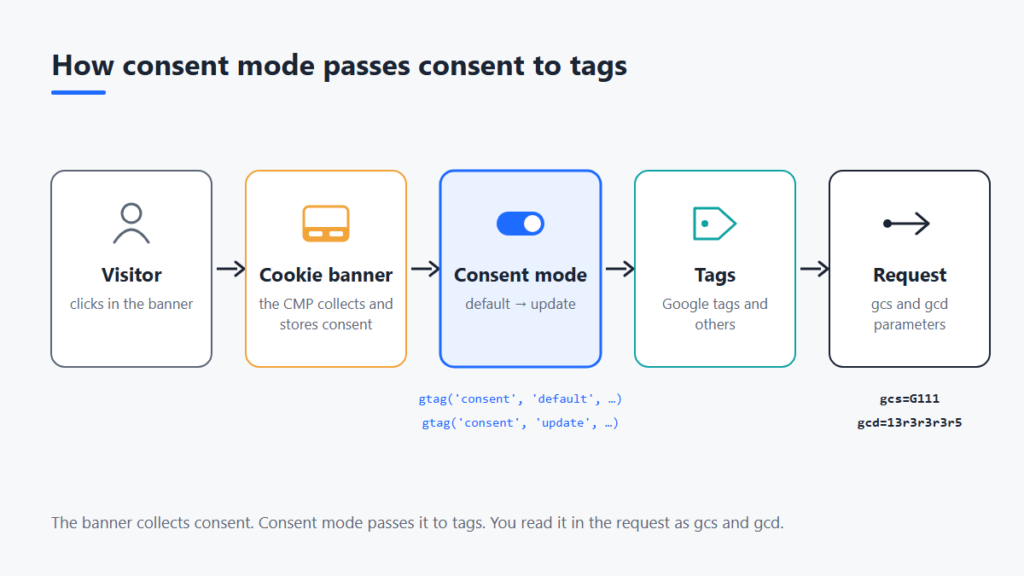
Having consent mode in place does not mean GDPR compliance. Technically, it only passes consent on. I wrote up what most often goes wrong with the banner in The 5 most common mistakes in cookie bar settings.
Consent types in consent mode
Consent mode works with seven consent types. For four of them, Google documents how its tags change behavior accordingly; the other three you can use for your own tags. Each has a value of granted or denied (documentation). The v1 and v2 labels in the table are two generations of consent mode; I describe the difference below.
| Type | What it is for | Who reads it |
|---|---|---|
ad_storage | storage (cookies, device IDs) for advertising | Google tags (since v1) |
analytics_storage | storage for analytics, for example visit duration | Google tags (since v1) |
ad_user_data | consent to send user data to Google for advertising | Google tags (since v2) |
ad_personalization | consent to personalized advertising (remarketing) | Google tags (since v2) |
functionality_storage | functional storage, for example language | your own use |
personalization_storage | personalization, for example recommended videos | your own use |
security_storage | security, authentication, fraud prevention | your own use |
The consent types form two logical pairs:
ad_storageandanalytics_storagedetermine what may be stored in the visitor’s browser. Withdenied, tags neither write nor read the corresponding cookies.ad_user_dataandad_personalizationdetermine what Google may do with the data.ad_user_datais consent for user data to be sent to Google for advertising purposes, for example for conversion measurement in Google Ads.ad_personalizationis consent for using that data for personalized advertising, typically remarketing (showing ads to people who have already visited the site).
Each type is a separate signal, so the banner can, for example, allow analytics and deny advertising.
What Google requires
Google requires consent signals for visitors from the European Economic Area (EEA), the United Kingdom and Switzerland, based on its EU User Consent Policy. For personalized advertising, both ad_user_data and ad_personalization must be granted. If ad_personalization is denied, remarketing in Google Ads receives no data. If ad_user_data is denied, the export of conversions by click ID (the identifier of a click on an ad) is limited (Google Ads Help).
From v1 to v2
The first version came out in September 2020 and had two consent types: ad_storage and analytics_storage. In November 2023, ad_user_data and ad_personalization were added. Google’s documentation justifies this by saying it is strengthening enforcement of its EU User Consent Policy (gtag documentation). So v2 is not a new product. It is two new signals.
What changed in June 2026 (as of October 2026)
From 15 June 2026, whether a Google Analytics 4 (GA4) tag collects advertising cookies and Google Ads identifiers is decided by consent mode alone (the consent setting for ads). Turning off Google Signals (a GA4 feature that links data to signed-in Google users) no longer stops it. Signals now only controls linking GA4 data to signed-in users for behavioral reports in GA4. Later in 2026, whether GA4 data is used to personalize ads in Ads is to be decided exclusively byad_personalization; Google has not announced a date yet (Google Analytics Help).
How to set up consent mode: default and update
The principle has two steps. First you set the initial state (default), then you change it after the user decides (update). In practice, this is usually handled by the cookie banner, or by the tag through which you deploy the banner in Google Tag Manager (GTM), the tool for managing tags on a site. But it is worth checking that this is really the case.
Here is an adapted example based on the official guide for gtag.js (the JavaScript library behind the Google tag), Set up consent mode on websites:
<script>
  window.dataLayer = window.dataLayer || [];
  function gtag(){dataLayer.push(arguments);}

  // Default state: everything is denied until the user decides.
  // Must run BEFORE the Google tag loads, and on every page.
  gtag('consent', 'default', {
    'ad_storage': 'denied',
    'ad_user_data': 'denied',
    'ad_personalization': 'denied',
    'analytics_storage': 'denied'
  });
</script>
<!-- The Google tag (gtag.js) loads only here -->

<script>
  // The CMP calls this function from an event in the banner,
  // at the moment the user accepts everything. It must NOT be
  // pasted in as a loose script: that would grant everything
  // to everyone right after the page loads.
  function onUserAcceptsAll() {
    gtag('consent', 'update', {
      'ad_user_data': 'granted',
      'ad_personalization': 'granted',
      'ad_storage': 'granted',
      'analytics_storage': 'granted'
    });
  }
</script>
Things to watch:
defaultmust come before the Google tag and before anyconfigorevent, on every page. Google says it directly: “If your consent code is called out of order, consent defaults won’t work.”updateis called right after the user decides. The choice has to be remembered by the CMP, which passes it on again when the next page loads.
The example corresponds to Advanced mode: the Google tag loads right away (I explain the difference below). And if the default is already set by your CMP or its template in GTM, do not add the manual snippet, or the default values would be overwritten or duplicated.

Lab note
The default denied works like a null hypothesis in statistics: until you have evidence to the contrary, the starting assumption holds. Here it reads “the visitor does not consent”. The evidence is the click in the banner, and update is the evaluation of the test: it either rejects the starting assumption or confirms it.
Besides the consent types, there are a few parameters that influence how tags behave:
wait_for_updateis the time in milliseconds that tags wait for an asynchronous CMP before they send a hit (a request carrying data).regionlimits the default setting to selected countries or regions (ISO 3166-2 codes, for exampleCZorDE-BY). The setting with the most specific region is applied. Withoutregion, the default applies to all visitors.url_passthrough: when cookies are denied, it carries ad click information, for example the GCLID (the Google Ads click identifier), between pages of the same site in link URLs, so that it is not lost along the way. It applies to Google Ads and Floodlight tags (the measurement tag of Google Marketing Platform).ads_data_redaction: whenad_storage='denied', it does the opposite and removes click identifiers from requests sent by Google Ads and Floodlight tags. You will find details on both in the documentation.
Consent mode in GTM
In GTM, you should fire CMP tags on the Consent Initialization – All Pages trigger, which fires before all other tags, including before the Initialization trigger (GTM Help). CMP templates from the Community Template Gallery use the setDefaultConsentState and updateConsentState APIs, so you should not call gtag('consent', …) manually in them.
Consent mode Basic vs Advanced: Advanced does not automatically mean better
Google distinguishes two modes in which consent mode works: Basic and Advanced. Both use the same consent types (for example analytics_storage) and pass them in requests with the same parameters. They differ in when the tags load and what leaves them until the user consents. This choice is easy to overlook during deployment.
Three terms I will need from here on:
- Cookieless ping is measurement without cookies: the tag sends Google a message that a visit or event happened, but without a user identifier.
- Modeling means that Google fills in the missing data from users who declined with a statistical estimate.
- BigQuery is Google’s database, where GA4 can export raw data for individual events.
| Basic | Advanced | |
|---|---|---|
| Loading of Google tags | only after interaction with the banner | immediately when the page opens |
| What is sent when consent is denied | nothing, not even the consent state | cookieless pings |
| Modeling in GA4 | none | possible, but only above thresholds |
| Conversion modeling in Google Ads | general model | advertiser-specific model |
| Users who declined in BigQuery | missing | events without a persistent ID |
Basic: nothing leaves from declined visits
In Basic mode, Google tags do not load until the user clicks in the banner. If they decline, nothing is sent to Google, not even the consent state. The price: in GA4 you don’t get the modeled data that fills the gaps (GA4 Help). In Google Ads, conversion modeling relies only on the general model. And users who declined are missing from the BigQuery export too, because nothing about them reached Google.
Advanced: cookieless pings and what they bring
In Advanced mode, tags load immediately and the default state is denied. Until the user consents, they send cookieless pings. According to Google’s help, these may contain:
- a timestamp,
- the user agent (the type of browser and operating system),
- the referrer (the page the visitor came from),
- the screen resolution,
- the IP address (part of normal communication),
- the consent state,
- a random number generated on every page load.
Without ads_data_redaction, with ad_storage='denied' the full page URL is also sent, which may contain the GCLID parameter, see GA4 Help.
In Advanced mode you get:
- Conversion modeling in Google Ads. It has minimum data volume requirements, though; the status is shown by conversion diagnostics in Google Ads.
- Behavioral modeling in GA4. For it to start working, you need at least 1,000 events per day with
analytics_storage='denied'for 7 days, and at least 1,000 daily users withgrantedon at least 7 of the last 28 days. If you are only slightly above these limits, it does not automatically mean modeling will be available (GA4 Help). - Cookieless events in BigQuery, that is, raw data without a persistent user identifier (so without any of the modeling mentioned above). Advanced therefore does not add the missing users to BigQuery. It delivers event counts that cannot be tied to users or sessions.
The risk: data leaves before consent
Cookies are not used in Advanced mode, but the browser still hands over technical data with the ping. This is primarily covered by Article 5(3) of the ePrivacy Directive (the directive on privacy in electronic communications), the rule on storing and reading data on a user’s device. The Czech implementation, Section 89(3) of the Electronic Communications Act, is covered in my article Cookie bars finally in Czechia. The European Data Protection Board (EDPB) reads Art. 5(3) in its Guidelines 2/2023 more broadly than just cookies. According to it, this also includes the situation where JavaScript on the page instructs the browser to send data to a server, and it can concern the IP address or user agent if sending them is triggered by such code. If this interpretation applies, even sending a cookieless ping may require consent, which is exactly what Advanced does before any click in the banner.
Google states that GA4 does not store the IP addresses of visitors from the EU, Switzerland and the United Kingdom and discards them immediately after determining geolocation (GA4 Help). The risk is therefore mainly that the transfer happens before consent. I did not find an explicit statement from a supervisory authority on Google consent mode.
Simo Ahava recommends Basic as the default choice and Advanced only after careful consideration with a legal team. The broader question of whether Google tags may load before consent at all I cover in the article on the Hannover ruling, GTM in violation of the GDPR. How the rules may evolve further I describe in the text on the Digital Omnibus.
How to decide
My take: if a site does not advertise in Google Ads to visitors from the EEA and does not meet the GA4 thresholds, Advanced will mainly bring risk. If it does advertise, the advertiser-specific conversion model can have real value (provided the account meets the data volume requirements), and that has to be weighed against the risk together with a lawyer or a data protection officer (DPO).
And once more: keep in mind that Advanced does not automatically mean better.
What it looks like technically: the gcs and gcd parameters
The requests that a Google tag sends contain parameters that tell Google the consent state. Google’s documentation mentions gcs and gcd, among others, but does not document their format and says it may change. For debugging, it recommends Tag Assistant, its debugging tool for tags. On top of that, the gcd parameter is always sent, even if you don’t activate consent mode. Its presence therefore proves nothing.
Heads up: the decoding below is not official. The meaning of
gcsandgcdvalues comes from community reverse engineering (notably Simo Ahava and CMP vendors). Google does not publish it and can change it at any time. Treat it as an orientation aid, not a specification.
gcs: two signals
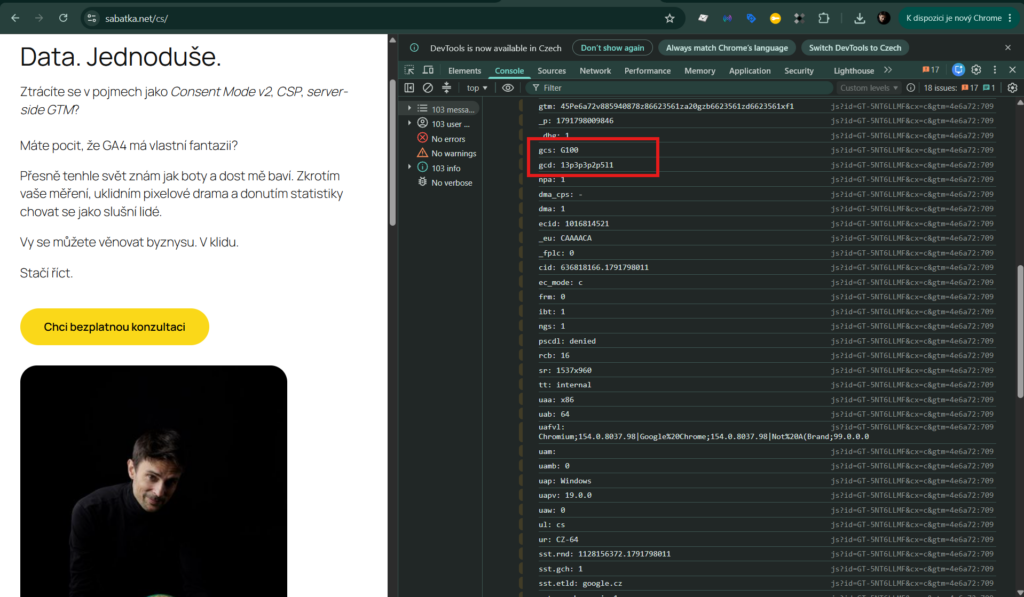
The gcs parameter knows only two signals, ad_storage and analytics_storage. It has the form G1xy, where x is ad_storage and y is analytics_storage. One means granted, zero means denied.
| gcs | ad_storage | analytics_storage |
|---|---|---|
G100 | denied | denied |
G110 | granted | denied |
G101 | denied | granted |
G111 | granted | granted |
You will see G100 only in Advanced. In Basic, nothing is sent after a decline, so there is nothing to read.
gcd: four signals and the difference between default and update
gcs knows only two signals. The consent mode gcd parameter arrived with v2 and carries all four, including the distinction between default and update. Again, this is a community observation.
The letters in gcd go in the order ad_storage, analytics_storage, ad_user_data, ad_personalization. Each letter encodes a pair: the default state and the possible update. I do not interpret the digits between the letters. Nobody has reliably documented their meaning, and they differ between sites; for reading consent, the letters are enough.
Two examples:
13r3r3r3r5: four timesr, meaning defaultdenied, updategranted. The user accepted everything.13l3l3l2l2: alll. Consent mode was not found, it is inactive.
And here is the cheat sheet for the individual letters:
| Letter | Default | Update |
|---|---|---|
l | not set | not set (consent mode not found) |
p | denied | no update |
q | denied | denied |
r | denied | granted |
t | granted | no update |
u | granted | denied |
v | granted | granted |
m | not set | denied |
n | not set | granted |
The table shows that before a click in the banner (default denied, no update) you will see p, after declining q, after accepting r.
How to verify it
Start with the simplest route: Tag Assistant, which Google itself recommends for debugging. If you want to see the raw request:
- Open the site in an incognito window. The CMP remembers the choice, so otherwise you would be testing an already stored state.
- Open DevTools and the Network tab. Type
collectinto the filter. - Click decline or accept in the banner and find the
gcsandgcdparameters in the GA4 requests. In Basic you will see no GA4 request after declining, and that is fine. - Check that the letters in
gcdare not alll. The mere presence ofgcdmeans nothing.
Google is not alone: consent signals on other platforms
Every platform needs a way to pass consent to its tags. The principle is similar everywhere: the consent signal must be set before data is sent. The syntax differs.
| Platform | How the signal is passed | What to remember | Documentation |
|---|---|---|---|
| Microsoft Advertising (UET, Universal Event Tracking) | consent mode with a single signal, ad_storage | Mandatory for the EEA, UK and Switzerland from 5 May 2025. Without a default set, UET assumes denied in the EEA, UK and Switzerland, and granted elsewhere. | Microsoft blog, UET help |
| Microsoft Clarity | clarity('consentv2', { ad_Storage: …, analytics_Storage: … }) | Mind the capital S. Enforced for the EEA, UK and Switzerland from 31 October 2025; without consent it runs without cookies. | Consent API v2 |
| Meta pixel | fbq('consent', 'revoke') before fbq('init', …), after consent fbq('consent', 'grant') | The call belongs on every page. | Meta documentation |
pintrk('setconsent', true) or false | With false, events are not sent. | ||
| Amazon Ads | Amazon Consent Signal (ACS), IAB TCF (Transparency and Consent Framework, an industry standard for passing consent) or GPP (Global Privacy Platform) | One of the three is enough; when several signals are present, TCF wins. | Amazon Ads |
The TikTok pixel has its own mode, see TikTok Ads Help. I described the consent setup for Clarity separately: Consent for MS Clarity.
FAQ
Is consent mode the same as a cookie banner?
No. The banner collects consent, consent mode passes it to the tags (see above). Without a banner, consent mode has nothing to pass on.
Is consent mode v2 mandatory?
Google requires consent signals for visitors from the EEA, the United Kingdom and Switzerland (EU User Consent Policy). It is a Google requirement, not a law. If you want to use personalization, remarketing or conversion measurement for these visitors, you need the signals. Google requires a certified CMP from AdSense, Ad Manager and AdMob publishers; advertisers have separate rules (AdSense Help).
Why did data in GA4 drop after deployment?
Only those who consented are measured, so a drop is expected. What remains from those who declined depends on Basic vs Advanced (see above). You can work out your share of consents from the article How to calculate the opt-in rate of cookie bars.
What do G100 and G111 mean?
These are values of the gcs parameter. G100 means both ad_storage and analytics_storage are denied, and you will see it only in Advanced. G111 means both are granted. The decoding is community-based; Google does not document the format.
Conclusion
Consent mode is not a cookie banner. It is the way the banner tells the tags what they are allowed to do. The basics are simple: a default state before the tags, an update after the decision, and a check of gcs and gcd in the request. The harder part is the choice between Basic and Advanced, which does not belong to the analyst alone.