
Everyone has heard of cookies — we click through the consent banner on every website. Few people can actually explain what a cookie is, let alone the difference between a first-party and a third-party cookie. Yet this exact mechanic is what attribution, remarketing, and GA4’s ability to recognize a returning customer all depend on. And in some browsers, cookie lifetime is far shorter than most marketers assume.
How many visitors does this actually affect? Across the projects I manage, I track browser share in traffic over time.
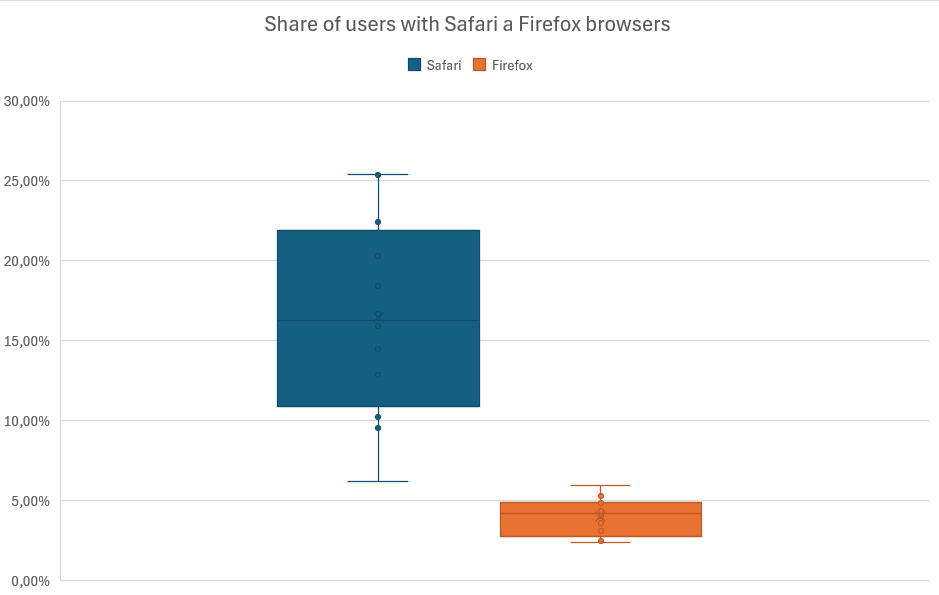
Across the (mostly Czech) sites I manage, the median Safari share is around 16 percent — roughly every sixth visitor. On some sites (with an Apple-leaning audience), it climbs to 24 percent, close to one in four. Firefox accounts for about 4 percent.
Why track Safari and Firefox specifically? Because these two browsers are the toughest on cookies — I’ll get into exactly how in a moment.
One scope note upfront: this article focuses specifically on cookie lifetime. I know visitor identity also fragments for other reasons — typically access from multiple devices or multiple browsers. I’m deliberately leaving those aside to keep the topic manageable. So assume the real fragmentation in your data is somewhat worse than what I describe below.
How Cookies and Storage Actually Work
Before we get into why cookies disappear, a quick primer: who actually sets them, and who they belong to.
A cookie can be set by the JavaScript in your tracking code, or by an HTTP header in the server’s response. And it can belong to the domain the visitor sees in the address bar (first-party), or to a completely different domain (third-party). A concrete example: you’re browsing shop.com — a cookie belonging to shop.com is first-party. If the same page also sets a cookie via the Facebook pixel’s HTTP header, that cookie belongs to facebook.com — and that’s third-party.
The combination of these two axes determines how vulnerable a cookie is to browser intervention:
| First-party (your domain) | Third-party (someone else’s domain) | |
|---|---|---|
| JS-set (set by JavaScript) | The _ga cookie, where GA4 stores the visitor identifier — the most common case on the web | Classic third-party ad pixels — blocked in Safari and Brave; Firefox isolates them into a separate “cookie jar” per site (partitioning — the effect on cross-site tracking is the same); still work in Chrome |
| HTTP-set (set by the server) | A cookie from server-side tracking, set by the server via the Set-Cookie header — typically with the HttpOnly attribute, so JavaScript can’t access it at all | Third-party trackers via HTTP header — practically non-functional today |
Google Analytics’ tracking cookie is a JS-set first-party cookie — JavaScript sets it. That’s exactly why most of what follows in this article applies to it.
If you already know this mechanic, feel free to skip ahead — it won’t affect the rest of the article. Let’s get into why cookies vanish sooner than their coded expiration date, no matter what you set.
Cookie Lifetime in Safari, Firefox, and Chrome
The cookie expiration date you set in code is only a ceiling. How long a cookie actually survives is decided by each browser on its own terms — and the differences are significant.
Safari: JS Cookies Survive a Maximum of 7 Days
Safari’s ITP (Intelligent Tracking Prevention) has a hard limit: it purges JS-set cookies after 7 days. No debate, full stop. And when a visitor arrives via a link carrying a known tracker’s parameters in the URL — typically a click from an ad with gclid or fbclid in the address (a technique called link decoration) — the limit gets even tighter: 24 hours.
On top of that, since version 14 (2020) Safari inspects DNS records to detect CNAME cloaking (when a cookie hides behind your own subdomain, typically in server-side tracking setups), and since version 16.4 (2023) it also compares IP addresses: if the server setting the cookie in the HTTP response doesn’t match even the first half of the main domain’s IP address (this rule only kicks in without CNAME detection, i.e. with an empty CNAME chain), the cookie gets hit with the same 7-day limit.
Apple turned on Advanced Fingerprinting Protection by default for all browsing in Safari 26 (September 2025). Fingerprinting is a technique for identifying a visitor without cookies at all: a script reads a combination of browser and device properties — screen resolution, fonts, how graphics get rendered — and assembles them into a practically unique “fingerprint.” Safari now restricts known fingerprinting scripts (typically off-the-shelf libraries websites deploy for this purpose) from accessing that data, and it also won’t let them store a long-lived cookie or localStorage entry — so there’s nowhere to persist the fingerprint. In private browsing, it additionally strips tracking parameters from URLs. This is documented behavior from WebKit’s own blog; the precise impact on specific measurement tools isn’t clear yet.
Firefox: Doesn’t Delete Cookies, Isolates Them
Firefox takes a different approach — as part of Enhanced Tracking Protection, it uses a mechanism called Total Cookie Protection. It doesn’t block third-party cookies; instead, it isolates each site into its own “cookie jar” (partitioning) — which amounts to the same outcome for cross-site tracking. But it leaves first-party tracking cookies alone; there’s no 7-day limit here like in Safari.
Chrome: You Can Set Cookies for Up to 400 Days
Chrome behaves differently than you’d expect if you’ve heard that “cookies are dying.” You can set a cookie to expire up to 400 days out, and despite years of announcements, Chrome still doesn’t block third-party cookies — Google officially killed Privacy Sandbox, the project meant to change that, in October 2025, and there’s currently no timeline for third-party cookies going away in Chrome. So the phrase “cookies are dying” applies in full force mainly to Safari and Brave.
Brave: The Strictest of All
Brave typically makes up a small share of traffic — and in GA4 you usually won’t even see it listed separately, since it identifies itself as Chrome. But when it comes to cookies, it’s the strictest of the bunch: it caps JS-set cookies at 7 days just like Safari, limits HTTP-header cookies to 6 months, and blocks third-party storage entirely — a third-party site gets only temporary ephemeral storage that disappears the moment the visitor leaves.
People Delete Cookies Too
On top of browser behavior, add device switching and manual cookie deletion — according to older studies, a third of users deleted cookies at least once a month (comScore 2007), and nearly two-thirds of tracking cookies ended up blocked or deleted (Flashtalking 2018). I haven’t found more recent research.
Treat those numbers as an illustration of the trend, not a current fact.
Your Own Consent Banner Can Delete Cookies Too
One more thing worth noting: your own consent banner can delete cookies too, if that’s enabled in its settings — before you start hunting for a browser bug, it’s worth checking so you don’t blame Safari for something you’re doing to yourself (consent banner misconfigurations can skew your data in other ways too).

Lab note
It’s like the half-life of a radioactive sample — a cookie’s lifetime isn’t set by the date you code into it, but by whatever the browser allows. Your audience decays the same way, day by day. In Safari, though, it’s decay with an ultimatum: whoever doesn’t return within 7 days doesn’t decay partially — they decay completely.
The Real-World Impact of Cookie Lifetime
The result: the actual cookie lifetime is dictated by whichever rule is strictest for that particular visitor. On sites with a higher share of Safari or Firefox traffic, that lifetime shrinks significantly.
And watch out for localStorage: it won’t save you in Safari — ITP wipes any script-writable storage (including localStorage) after 7 days of browser use without interacting with the site. Chrome and Firefox don’t clean it out this way, but you’re dealing with this problem because of Safari in the first place — so don’t expect more persistence from it.
Numbers From Practice
How much does one real person actually multiply in your data? A few years ago, I analyzed traffic on an intranet where I knew the user ID behind every single visit — and where people logged in repeatedly from the same devices. You couldn’t ask for better conditions for cookies to survive. Even there, the number came out at roughly 2.1 GA4 users per one real person (one real person = one unique user ID).
For public websites — without logins, with a higher share of Safari and mobile traffic — I’d expect a noticeably higher number, easily three or more GA4 users per real visitor. I haven’t measured that one; it’s an estimate based on the mechanisms described above.
That’s why GA4 shows more users than you actually have: nobody vanished from your data. Everyone’s just being counted more than once.
The Impact on Measurement and Marketing
All of this stays academic until you run it against your own purchase cycle. What actually happens when a cookie dies before the customer’s path to purchase is complete?
Multi-visit attribution breaks. GA4 links visits from the same visitor via the _ga cookie (client_id). If the cookie dies between a visit from a campaign and the visit where the conversion happens, GA4 won’t connect the two. The conversion gets attributed to the last source — often direct — and the customer looks brand new in your data, even though they’ve known your brand for weeks. (Direct traffic has other, far more common causes too — poorly tagged UTM parameters or redirects that don’t preserve them. Cookie decay is one contributing factor, not the whole explanation.)
Affiliate commissions disappear. Affiliate systems commonly set a 30-day cookie window. If it’s a JS-set first-party cookie (the common setup today), that window is effectively 7 days in Safari — the remaining 23 days exist on paper only. A third-party affiliate cookie doesn’t work in Safari at all.
The conversion window for ad platforms shrinks. gclid and fbclid, which Google Ads and Meta Ads use to measure conversions, get stored in _gcl_aw / _fbc — JS-set first-party cookies that typically get hit with an even stricter 24-hour limit in Safari: they’re created right after a click from a domain ITP classifies as a tracker (google.com, facebook.com), with a click ID in the URL — exactly the conditions of the link decoration rule. Platforms compensate for some of this loss through modeling via enhanced conversions — more on that in the section on moving beyond cookies.
Remarketing splits into two layers with different impact. Classic remarketing via third-party cookies doesn’t work in Safari at all — and hasn’t since 2020, not “after 7 days.” Audiences built from first-party data (GA4 audiences, lists built from gclid) do work, but they lose anyone who doesn’t return within 7 days.
A/B tests get noisier. A visitor whose cookie has expired might get a different test variant on their next visit than the one they saw the first time. That doesn’t break the test — but the added noise extends how long it takes to reach statistical significance.
None of these impacts is a catastrophe on its own. Added together, they hurt.
Evaluating Measurement Setups
If you want a cookie that actually survives, it needs to be:
- Set via an HTTP header (not JavaScript)
- First-party — ideally on the exact same domain (e.g. www.myshop.com)
The simplest setup — classic client-side Google Tag Manager (GTM) plus GA4 — has exactly the cookie lifetime described in the previous section. Nothing more, nothing less. It’s also the simplest and cheapest option, and for plenty of sites with a short purchase cycle, it’s entirely sufficient.
Once a company starts considering server-side tracking cookies (I covered what server-side tracking is and why it matters in a separate article), it typically runs into three variants of server-side Google Tag Manager (sGTM) — and each solves a different piece of the problem:
| Setup | Safari lifetime | Blocking resistance | Complexity / cost |
|---|---|---|---|
| Classic GTM + GA4 (client-side) | 7 days (JS cookie), third-party cookies don’t work at all | Low — blocked by both ITP and ad blockers | Low |
| sGTM on a subdomain, default Cloud Run deployment | Still 7 days — the CNAME cloaking trap (see below) | Medium — bypasses script blocking, not the ITP limit | Medium |
| Google Tag Gateway | No change — still 7 days (solves script blocking, not the ITP limit) | High for the Google stack, zero for everything else | Low to medium |
| sGTM behind your own infrastructure with matching IP | Full coded expiration (up to 400 days in Chrome) | High across tools | High |
The closer you get to having the server set the cookie instead of JavaScript, the less the ITP 7-day limit affects you.
Here’s a trap that catches almost everyone who sets up server-side tracking on their own: sGTM on a subdomain via the default Google Cloud Run deployment. It looks like a solution — the cookie is now “set by your server.” Except the default way of connecting a subdomain to Cloud Run goes through a CNAME record pointing to a Google server (ghs.googlehosted.com) — and that’s exactly the pattern Safari has flagged as CNAME cloaking since version 14, cutting the cookie’s lifetime down to 7 days. And even if you connect the subdomain directly via an A record to Google’s IP, a second safeguard catches it starting in version 16.4: Safari compares the server’s IP address against the main domain’s IP, and if not even the first half of the address matches, the cookie takes the same hit. The client thinks they’ve fixed it. They haven’t.
Google Tag Gateway is a newer offering from Google — and it’s worth being precise here, because the name invites a wrong assumption. Gateway doesn’t solve the ITP 7-day limit or the trap described above; JavaScript still sets the cookies, so Safari trims them to 7 days exactly as before. It solves a different problem: script and request blocking (ad blockers, signal loss), by routing everything through your own domain. From a cookie lifetime standpoint, it’s not a fix. It also does nothing at all for tools outside the Google stack (Meta, affiliate systems, CDPs).
I consider Google Tag Gateway a solid option for companies that measure almost exclusively through Google and are mainly fighting blocking.
The last option — sGTM behind your own infrastructure with the same IP as your main domain — solves the problem most completely.
If you’re already using Cloudflare or a similar CDN, or a Cloud Load Balancer, this can be relatively straightforward. If not, this path is fairly demanding.
What Makes Sense for Whom
Before you decide to change anything, work out three numbers: how long your purchase cycle is, what share of Safari you have in your audience, and how much you’re willing to invest.
An online store where people buy within two days of their first visit is dealing with a completely different problem than a B2B company with a three-month decision cycle. For the first, Safari’s 7-day limit barely matters — most conversion paths fit inside it. For the second, it can wipe out attribution for customers who return repeatedly over the course of weeks.
You’ll find your Safari share in GA4’s browser report over the last 90 days. If it’s under 10 percent and your purchase cycle is short, stick with the classic GTM + GA4 setup — the investment in server-side tracking won’t pay off, unless you have another solid reason: typically fighting ad blockers or needing better conversion data quality for campaigns.
If your Safari share is high (typically B2C brands with an Apple-leaning audience) and you also have a longer cycle or rely heavily on remarketing and affiliate, server-side tracking makes sense — but choose based on the previous section, not on whatever the first agency pitches you. Google Tag Gateway is enough if you measure almost exclusively through Google. Otherwise, plan for the more demanding option.
In the end, budget decides between “good enough to patch it up” and “let’s solve this properly” — both answers are legitimate, as long as you’re working from numbers, not anxiety.
Moving Beyond Cookies
Cookies aren’t the only way to connect a visit to a conversion.
Most tools today can connect visits and conversions through hashed personal data — email, phone number, or a login user ID. Google Ads has enhanced conversions for this, Meta has advanced matching, and GA4 has the User-ID feature; I covered how platforms hash personal data in the context of web forms. More advanced companies go a step further and connect customer identity across sources (website, CRM, online store) in a customer data platform (CDP) — that’s called identity resolution, and it deserves an article of its own.
If you have a longer purchase process, this is a direction well worth considering: identity built on login or email doesn’t depend on whether a cookie survived the week.
Conclusion
Whether your attribution and remarketing actually work, or just look like they work, comes down to two things: cookie lifetime and how well you handle visitor identity. A cookie on its own isn’t a durable identifier — it’s a fragile thing whose survival is largely dictated by the browser, not by your settings in some admin panel. If your purchase cycle runs longer than a week, your Safari measurement is systematically lying to you — typically for every sixth visitor, and on some sites every fourth.
I’ll take a look at your Safari share and purchase cycle length and tell you whether it’s worth changing your setup — and if so, how.